Distributed work increases security risk, but with the right approach, protection remains strong. This guide covers key best practices for securing remote teams, including identity and device management, data protection, training, and incident readiness, helping organizations scale securely in global environments.
Partnering with a remote staffing provider like iSWerk also supports secure onboarding, access control, and operational consistency from day one.
Introduction
Distributed workforces are now the norm for many growing companies. Remote staff and hybrid teams give organizations access to global talent, improve flexibility, and reduce overhead, but they also introduce new security challenges.
When employees and contractors work from different locations, networks, and devices, your organization’s “attack surface” expands. Laptops connect over home Wi‑Fi, tools are accessed from personal devices, and sensitive data travels far beyond a traditional office perimeter.
The good news? Distributed work can be secure. Most security risks can be significantly reduced with a few consistent, well-prioritized best practices that balance protection with productivity.
Below, we break down practical security best practices every organization should implement to protect data across remote teams—without slowing work down.
Why Distributed Teams Face Unique Security Risks
Remote and distributed teams operate in environments that are harder to control than a centralized office. Employees and contractors work across different locations, networks, and devices—often outside the visibility of traditional perimeter-based security models.
According to the World Economic Forum’s Global Cybersecurity Outlook 2026, organizations continue to rank ransomware attacks, cyber‑enabled fraud and phishing, and supply‑chain disruption among their top cyber concerns. These risks are amplified in distributed workforces, where attackers can exploit gaps in access control, device management, and third‑party integrations.
Common risk factors include:
- Unsecured networks (home or public Wi‑Fi)
- Personal or unmanaged devices used for work
- Inconsistent onboarding and offboarding, especially for contractors
- Phishing and social engineering attacks targeting remote workers
- Shadow IT, where employees use unapproved apps or tools
Remote work itself isn’t the problem; inconsistent security controls are. Standardizing how people access systems, devices, and data makes the biggest difference.
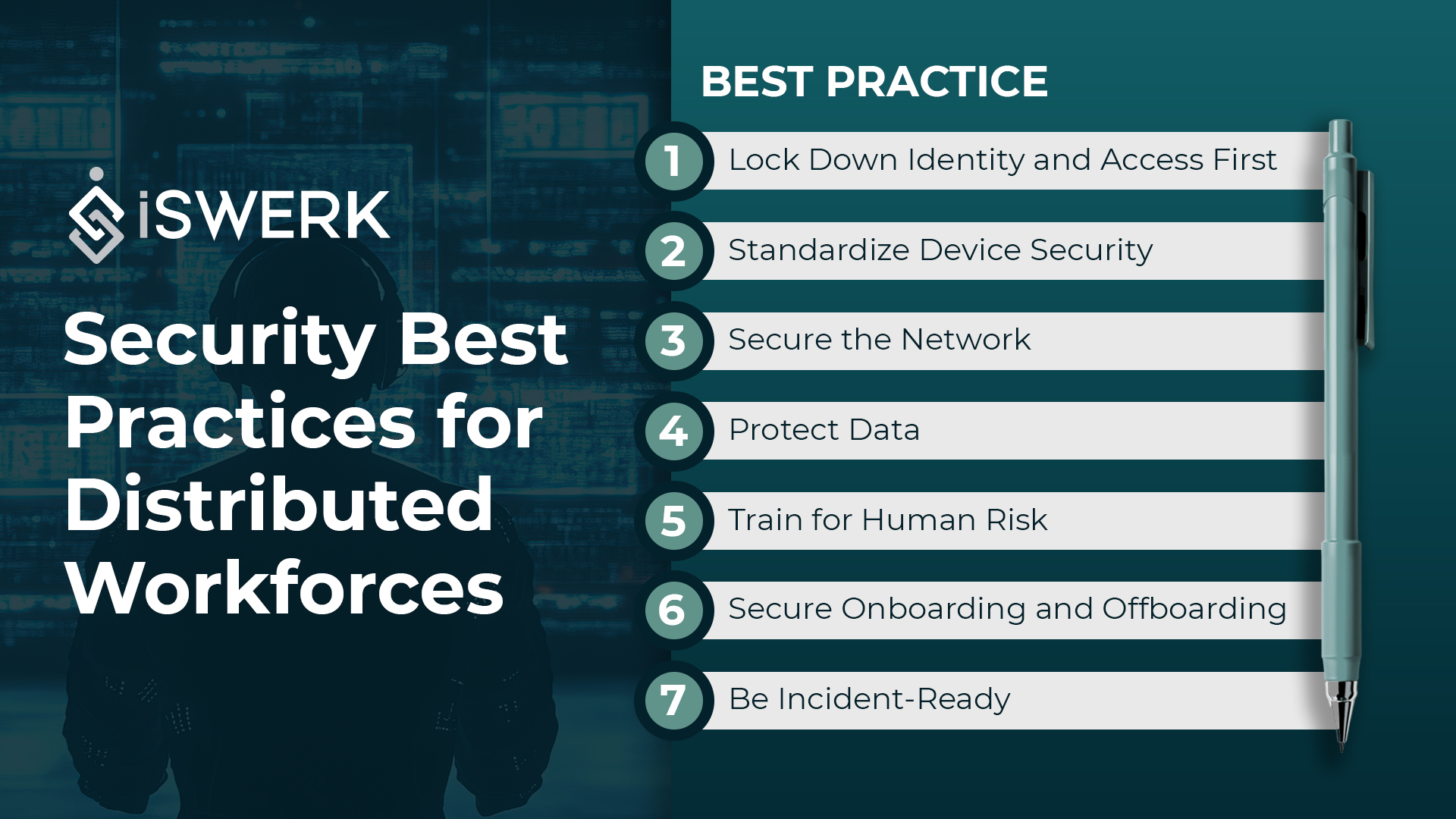
Best Practice #1: Lock Down Identity and Access First
If you only prioritize one area, make it identity and access management.
Enforce multi-factor authentication (MFA)
Require MFA for all critical systems, including:
- Collaboration tools
- Cloud storage
- CRM and finance platforms
- VPN or secure access tools
MFA alone can prevent a large percentage of account-based attacks.
Apply least-privilege access
Not every team member needs access to everything.
- Use role-based access controls
- Grant only what’s required to do the job
- Remove admin rights by default
- Use time-bound access for contractors and temporary staff
Centralize access management
Where possible:
- Use single sign-on (SSO)
- Standardize onboarding and offboarding workflows
- Review access regularly, especially when roles change
Quick win: Tight access controls reduce both breach risk and accidental data exposure.
Best Practice #2: Standardize Device Security
Every remote device is an endpoint—and a potential entry point.
Set baseline device requirements
At minimum, require:
- Up-to-date operating systems
- Automatic security updates
- Screen locks with strong passwords
- Full-disk encryption
Separate work from personal use
If you allow BYOD (bring your own device):
- Define what work data can and cannot be stored locally
- Use work profiles or managed apps where possible
- Limit access to sensitive systems from unmanaged devices
Prepare for lost or stolen devices
Have a clear plan for reporting lost devices, remote wiping company data, and resetting credentials immediately.
Best Practice #3: Secure the Network (Beyond “Just Use a VPN”)
Remote access security has evolved beyond traditional VPNs.
Use secure access tools appropriately
- VPNs still work for basic use cases
- Zero Trust principles (verify explicitly, least privilege, assume breach) offer stronger protection
- Restrict access based on identity, device posture, and role—not location
Reduce exposure on public networks
- Discourage public Wi‑Fi when possible
- Recommend mobile hotspots if available
- Always pair public access with secure connections
Tip: Even simple network controls, combined with MFA and device security, dramatically reduce risk.
Best Practice #4: Protect Data Wherever It Lives
Distributed teams rely heavily on cloud tools, which makes data protection critical.
Classify your data
Define rules for handling:
- Customer and personal data
- Financial information
- Credentials and API keys
- Internal documents
Standardize approved tools
- Use company-managed cloud storage
- Restrict personal cloud accounts for work files
- Disable uncontrolled file sharing where possible
Prevent oversharing
- Limit external sharing by default
- Require approval for sensitive documents
- Regularly review shared links and permissions
Ensure backups and recovery
- Confirm critical systems have backups
- Enable version history to recover from accidental deletion or ransomware
Best Practice #5: Train for Human Risk
People are often the first line of defense and the first target.
Train remote team members to:
- Spot phishing and spoofed messages
- Verify payment or account change requests out-of-band
- Never share passwords or MFA codes
- Report suspicious activity immediately
Common red flags include:
- Urgent requests that bypass normal processes
- Messages that look internal but come from external domains
- Unexpected file or link requests
- Changes to payment or banking details
Regular, lightweight training goes a long way.
Best Practice #6: Secure Onboarding and Offboarding
Onboarding and offboarding are often overlooked security controls.
Secure onboarding essentials
- Provision accounts using a standardized checklist
- Grant access based on role, not convenience
- Provide security guidance during the first week
- Confirm device and tool compliance early
Secure offboarding essentials
- Disable accounts immediately
- Revoke shared links and access tokens
- Transfer ownership of files and credentials
- Collect or remotely wipe devices when applicable
Remember: Offboarding is a security process, not just an HR task.
Best Practice #7: Be Incident-Ready (Even with a Simple Plan)
You don’t need a complex incident response program—but you do need a plan.
At minimum, define:
- Who to contact if something goes wrong
- How to isolate a compromised device or account
- What evidence to capture (timestamps, screenshots, emails)
- When to reset credentials and review access
- How to communicate internally during an incident
Clear steps reduce panic and limit damage.
Remote Security Checklist
Must-have (Week 1)
- MFA on all core systems
- Role-based access controls
- Device update and encryption requirements
Should-have (Month 1)
- Standardized onboarding/offboarding
- Approved tools and cloud storage
- Basic security training for remote staff
Nice-to-have (Quarter)
- Zero Trust access model
- Endpoint monitoring or device management
- Regular access reviews and simulations
How iSWerk Supports Secure Distributed Teams
Security isn’t just about tools; it’s also about people and process.
iSWerk helps companies scale distributed teams with:
- Clear role definitions and access boundaries
- Structured onboarding and offboarding workflows
- Consistent workforce standards across remote hires
- Operational support that reduces risk from day one
By combining the right people, processes, and security practices, organizations can grow remote teams with confidence.
Building or scaling a distributed workforce?
iSWerk helps organizations hire and manage reliable remote talent while maintaining strong operational and security standards. Learn how iSWerk can support your distributed team strategy.